BLOG

Tali AI Product Team
January 8, 2026


“It’s like I wrote this note” is one of the best compliments we’ve received about Ambient Scribe, Tali’s AI Scribe that generates notes from listening to your conversation with the patient. Unfortunately, while we always like to think the customer is always right, we had customers asking for completely opposing styles in their notes, and insisting that what we had was wrong!
Feedback about style has been plentiful since we launched Ambient Scribe earlier this year. Everyone wants their notes to be consistent and comprehensive, but has their own requirements and priorities for how the same conversation with the patient should be represented. We’ve decided to solve this problem by allowing each user to customize how their SOAP notes are written.
You can set SOAP note preferences in your profile in both the desktop app and Chrome extension.
How to set preferences for your SOAP notes:
Step 1: Log in to Tali (OK, maybe that was a bit obvious).
Step 2: Navigate to your Profile:

Click the Profile Button
Step 3: Choose SOAP Preferences:

Review Options in your Profile
Step 4: Select your preferences, using the examples to guide you.
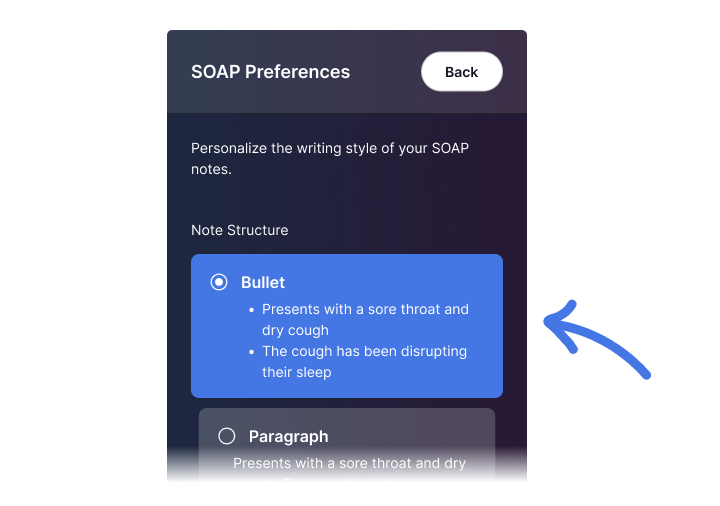
Choose which preferences suit your style
Step 5: Click Back to get back to the home screen, and try them out!
Thank you to all those who provided feedback for us, keep it coming!
New to Tali? Try it out today.
Experience the future of healthcare documentation with Tali's AI-powered solutions.
Related Articles


Research
January 8, 2026
1
Research
January 8, 2026
1
Research
January 8, 2026
1